Some usability improvements and an updated look

As regulars may have noticed we pushed out some design changes over the weekend which we think significantly help the usability and legibility of the website. These changes also act as a bridge to the much more sweeping changes which will be launched in early 2016. While I do understand that changes can be annoying, I hope that everyone can trust that we have the best interests of site members at heart. Here's a quick summary of some of the changes.
A new font to improve legibility
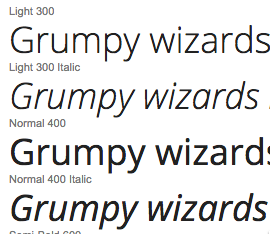 Some of the traditional sans-serif fonts used on the web like Helvetica and Arial have come in for a lot of criticism due to their poor legibility. While readers have become accustomed to them readership testing has shown they perform particularly poorly. We have changed the font on the site to use Open Sans which is specifically designed for legibility. It has been adopted by the huge blogging platform Wordpress as the de-facto standard across their sites which I think says a lot for its legibility.
We are still working on improving the font-sizing and line-heights around the site so if you are struggling to read the font anywhere please let us know and we'll try to make adjustments. I think we will all agree that these blogs are a far more pleasurable read - I'm finding I don't have to squint any more - we'll be increasing the comment font-size this week.
Checkboxes on the left
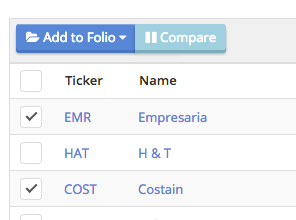
All the stocks in lists and tables on the website now have their checkboxes on the left rather than the right. When checked the action buttons are at the top left, rather than the bottom right of the list. This is a big usability improvement and brings the design more in tune with the web-standards seen at sites like Gmail.
These buttons let you add stocks to your Folios or compare them side by side. It was so much simpler for me to explain how to add stocks to Folios at our presentation on Saturday at the UK Investor Show. It's an intuitive design and I'm thrilled we've put it in place.
Analytics on any Folio
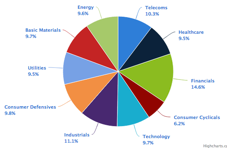
For a long time you've only been able to view portfolio allocation and analytics on portfolios that have position sizes / transaction data logged. This has been a real pain. So we decided to liberate these analytics so you can see them on any of your lists without entering transaction data.
We treat these watchlists as equal weighted portfolios for analysis purposes, and generate a 1 year performance chart from their price histories. Just click the Analysis or Allocation tab on any watchlist / Folio and you'll see what I mean.
Other adjustments
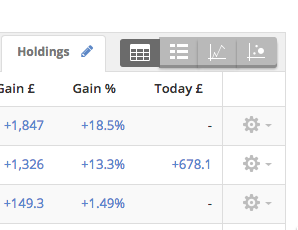
We've improved the design of the StockReports, Screener and Folios to make them more usable and updated various icon sets to better reflect their underlying content. For example check out the 'view bar' at the top of every table. The icons are far clearer - you will be able to find the bubble charts a bit more easily around the site.
Onboarding

We hope to provide easier onboarding for new members in due course so that it's super easy to learn about the site and get your portfolios up and running. We've added some helpful navigation buttons to the homepage and our designer Adam has made an extremely useful orientation video for those who want to get started. Please do check it out on the homepage.
Very happy to field comments here about the changes. Whenever we've done this kind of thing before we've had some quite mixed feedback, so I do hope nobody is too upset. We'll have to update some of our help pages & video tutorials to reflect the changes which may take a couple of weeks - please bear in mind we're a small team working as hard as we can !
Disclaimer
This is not financial advice. Our content is intended to be used and must be used for information and education purposes only. Please read our disclaimer and terms and conditions to understand our obligations.
14 comments
As a quick update, I'm back home, on bigger, and higher quality monitors, and have to say that I find the new site appearance very clear now. So maybe my earlier reservations were due to the slightly smaller and lower quality reconditioned monitor I use at my London pied-a-terre? Maybe you guys have tweaked the fonts a bit too, but whatever, it's very clear now I think, and certainly no remaining reservations from me on being able to read it clearly. Thanks. The SCVRs look lovely now I think - the text is bigger, clearer, wider, and paragraphs are spaced out a lot better, so I find it much easier to read & edit now. A definite improvement.
Regards, Paul.
HI Ed,
Thanks for allowing the analyctic and allocation changes. I think I have already requested this through your support channel but i think didnt get much votes.
But one 'wee' annoyance I find with the allocation pie chart is the 0% (hidden) holdings still appear. If it is not too hard and time allow it would be great for these to be hidden on the pie charts too.
Good Improvements thank you
Hi,
I think the aesthetics of the new design on the StockReports is lovely.
However, as others have mentioned, the user base here is probably mostly the over-45s, and certainly in my case my eyesight has badly deteriorated in the last few years (I'm nearly 47). Therefore, even with glasses, I struggle to see most websites, so have to set my browser to 125% for everything. The trouble is that people who create websites are generally younger, and have perfect eyesight!!
Setting zoom to 125% helps, but the other main problem is fonts which have inadequate contrast. As I'm typing this for example, the text seems to be grey rather than black. That makes it harder to see. Also with the blue text which is used on the StockReports for headers, it looks quite feint to me, so I have to look closely to read things.
Here's a suggestion - could there perhaps be a toggle button which users can set, which gives standard view (as it is now) for people with good eyesight, and a "high contrast" view, for people such as myself with imperfect eyesight, which would make all the text black, or dark blue, and have no grey shading, or other stylistic aspects which can make things harder to read, especially in the evening once you're tired?
I certainly don't want to undermine a very nice design change, in terms of appearance though. It looks smarter & more modern. But personally I find it a little harder to read now, but not disastrously so.
The other changes you have made sound very good. There is so much good stuff buried in Stockopedia, that even though I'm on the payroll, I often forget about useful features on the site!! So sometimes I spend a bit of time on a weekend just having a general rummage through the site.
Regards, Paul.
Hi Ed
Firstly, congratulations on an excellent and ever improving investment resource, plus congratulations on your and Paul Scott's contributions to the UK Investor Show.
Perhaps you could give some indication on the time line for improving the charting facility? For example, at least to keep indicators consistent when one changes the time range. To give a simple example, if you set up a chart with a 200 day moving average over a 1 year time range, then if you switch to a 2 year time range then the moving average annoyingly changes to a 200 week moving average, and a 200 month moving average over a 5 year time range.
Also, any progress on adding more sophisticated technical indicator analyses and , at least, adding technical indicator alerts?
Best wishes
David Talbot
Hi Edward,
I notice that you have dropped the "yield" figure in the box that displays info about shares written about in posts, is this intentional or an oversight?
I ask because I like a quick look at p/e and yield when reading posts.
Regards
mrwhits.
Yes - people had asked for the StockRank in the popover... but the yield shouldn't be dropped. We'll add it back.
Great. I also like seeing the yield like mrwhits.
S
The Health Trend, Bankruptcy Risk and Brokers Consensus text immediately under the colour bars are actually blurred for whatever reason.
NI
I am very pleased with the changes but wish we could have clear distinct typeface sizes, colours and backgrounds particularly in the tables. As you age eyesight does not improve and the habit of using grey or faded colours on indiscriminate backgrounds, and in some cases smaller type, makes identifying and reading difficult. I preferred the clear type and full blooded colours we had before. Overall the site is more cohesive. Well done.
Mike Cornwell
I agree, toying with it, it looks better with a darker colour and less scaling down on the comments' text, which are part of the main payload of the discussion pages. See app.css lines 472/3, font-size say 85% instead of 75% and black or a darker grey (e.g #111).
Also maybe the hierarchy is upside down when the sidebar's content is in larger type than even the main post's body text.
"As you age eyesight does not improve and the habit of using grey or faded colours on indiscriminate backgrounds, and in some cases smaller type, makes identifying and reading difficult."
I strongly agree with this comment.
I find myself moving nearer the screen to read. Not good. Eye strain will be an issue. Larger text and higher contrast (between text and background) would help.
Ok - we've literally just now deployed changes to the font-sizing & line-heights of comments... as well as the saturation/hues of colours in tables ... should be easier to read now. Do let us know if not.
Hi,
On the whole I like the updates to the look and feel of the site, however am I the only person who think the font size/format for the discussion comments is too small and wiry.
I also think that the saturation for the red and blue associated with the movers and shakers (e.g. High Stock Rank promoted today) on the home page is weak and at first glance they are hard to tell apart.
Warm regards
Phil