Tips for using Stockopedia during reporting season

I cannot stress enough the value of a tool like Stockopedia during reporting season. With ranks and financials being completed for our largest businesses within 24-36 hours, there is no more crucial time to have this tool by your side.
Below are a few tips to help you navigate the program during this time (beyond the obvious benefits you are already aware of.)
How do I know I am looking at the latest numbers?
I am often asked how I know I am looking at the latest report for a company on the StockRank page. It’s actually quite easy to do, though it takes a little bit of snooping in the Accounts section. But here is a little tip that helps me find out the easiest way.
Step 1 - Make note of the end of the company's reporting year. 30 June is the most common for companies. Therefore you know that the next numbers to be released will be annual.
Step 2 - Look at the most recent data column of historical numbers. If the column is headed by a year (at the moment it will be 2023) Then you know it is an annual result
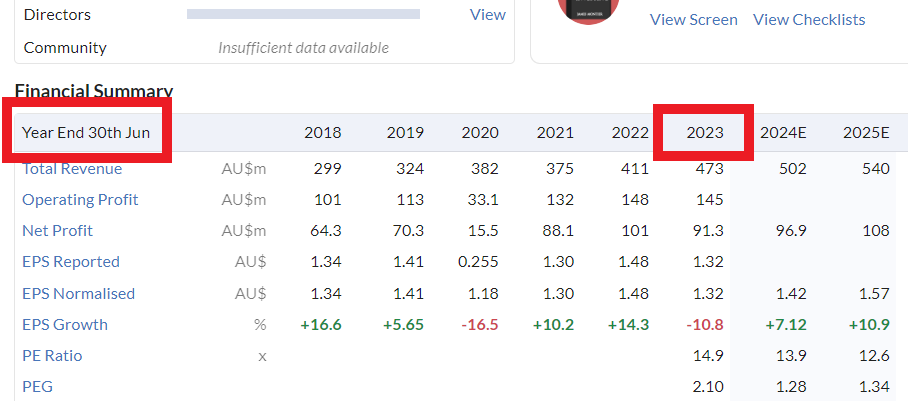
The alternative will be TTM (Trailing 12 months) which is what we display if the latest data is an interim result. If you see TTM in the column heading it means the latest annuals aren’t in the system yet. Have a look at the example below where I can tell the latest annuals haven’t been updated.
You will note that the company has a 30 June annual report date, however the column heading to the right reads “TTM”. This means that the latest data in the system is an interim figure. Once the annual results come into Stockopedia that will change to “2023”

How can I find stocks where earnings are “flying?”
OK… so the obvious answer here is to run a scan that looks for stocks with EPS Growth greater than 30%.
However there is another way I like to look for them which is a bit outside the box. About one week after reporting season is done (around 7-14 September) I will run the following screen:

All I want this scan to do is show me stocks where the forecast FY1 has been upgraded by analysts over the past month and over 3 months. And I want the same for FY2 (second year forecast).
OK…. So why is this particularly useful after reporting season? What am I looking for?
If I wait until the middle of September, many companies “should” have their latest numbers in the system. So when I run this screen what I am hoping to find are stocks who 3 months ago (before they reported) were seeing analyst upgrades since the company reported have seen subsequent upgrades (1 month figure).
So if a company has reported and the current estimate is higher than what it was 3 months ago, there is a good chance the company had been upgraded before it reported. The fact we also look on a 1 month basis will add to the likelihood that it has been upgraded since the report.
Why wait till the middle of September to run the scan?
The majority of companies report in the later part of the month. Giving to mid-September allows enough time for the company to report the numbers to be analysed by analysts and then added to Stockopedia.
You can run the scan today but you need to check that a company has reported. So if you did, you will see Suncorp and AMP. In the case of Suncorp, it reported on the 9th August. I can see the company EPS FY24 has been upgraded by 2.4c over the month (most recently on the 16th- after it reported) and I can see for 3 months EPS FY24 had been upgraded by 3.2c looking over to the EPS consensus chart I can see, the stock had been upgraded prior to the report and after. I can see the same for the FY25 forecasts.


IMPORTANT NOTE: There may be some instances where a company will be both positive on a 1mth and 3mth, however this may hide what has actually occurred. So for example, say before a company reported there had been a consistent downgrade cycle. And then after the company reports, analysts turn super bullish and upgrade the number sufficient enough to turn the 1 and 3 month periods. That is not what I am trying to find here with this scan.
What I want is to find companies that were being upgraded before and then after they reported. AMP is a perfect example of what I am not looking for. They have reported, however there were downgraded before the report, but the large upgrade since has meant the 3 month figure turned positive. Again, not quite the scenario I am looking for.

Therefore don’t rely on the screen results blindly. You still need to look at each stock.
How do I know what a company looked like before it reported and its numbers were updated in Stockopedia?
Often investors will learn more about a company’s report from the gravity of change in numbers rather than absolute figures. Therefore it is particularly useful to see what a company was and what it turned out to be.
The first and most obvious way is to monitor the StockRank change over time by looking at the line graph just below the price graph. When you move your mouse across the StockRank and date will appear.

NOTE: If you change the time period you will be able to monitor changes over a longer period.
Next, to get a sense as to how the individual Factors have moved this earnings season, once a company has reported you can hover over the Factor score and you will see how the score has changed. An arrow next to the number means the move has been by more than five places either up or down.

Even if the Factor has no arrow next to it, it may have still changed slightly. Again hover over it and it will tell you.

Finally there will be some that want to know how individual Factor have changed over a longer period that 30 days. For example, what if I want to know what a company’s Value score was 6 months ago so I could compare it against today?
While unfortunately there is no easy way to do this task, it can be done. All one needs to do is with the StockReport page, click on “Print” and then select a time period approximately 6 months ago. In this example, I have chosen a date in March as I know the financials at that time would have been updated.

What then appears is a PDF report of the StockRank page at that time, including the various Factor scores. I can then compare the old scores to the current.

How can I tell the ex-dividend date of a coming dividend?
The quickest and easiest way to find when a company will pay you a declared dividend is to look under Dividends on the StockReport page and we display it.

Remember to get more granular details on your dividend be sure to go to Accounts >> Dividend Summary

And a reminder at the moment we don’t have Franking Credits available within the platform on account of us being the only ones that need them globally. However it is number #1 on our demand list and HQ are reminded of this - frequently.
How do I know when my companies will report?
There is no rule that states a company must declare when they will report. Also nothing compels them to report on the date they said they would. But we have tried our best to help with a reporting season calendar that you can access here.
How long does it take for new company data to get into Stockopedia after it reports?
As discussed in the most recent Friday Lunch ‘n Learn session, this is a two step process.
First is to get the data into Stockopedia from our data supplier Refinitiv (formerly known as Thomson Reuters). While there is no set timelines, generally if the stock is in the ASX200 expect to see updated numbers within 24 hours. For those outside of the big guys the timelines can be variable depending on the complexity of the company and the timing of when they release. If they choose to release on the last day they join the queue of everyone else who waited to the last minute.
Second is that the StockRank scoring process occurs at a separate time to the data arriving and is done globally (ie all stocks are ranked at the sametime) therefore while you will see the current financials in Stockopedia, it can take about another 12 hours for the actual StockRank figures to be updated.
In short,for our biggest most well covered companies expect the process to take 24 - 36 hours.
If however you notice that there seems to be a delay on the arrival of data for a stock, please let us know immediately and we will follow it up with our data supplier.
How can I monitor how the stocks in my Portfolio are shifting?
Again, as highlighted in the Lunch ‘ Learn session. The Folios area is a great tool to do this. Simply put your holdings into a Folio (you can enter your transactions if you wish for more representative reporting). The next step is to select the Factor combo you wish Quality/Vale, Quality/Momentum or Value Momentum and then ensure the majority of your holds are floating towards the top right corner, and scrutinise those floating in the bottom left.

But during reporting season what becomes important is how they move. Do they steadily move higher in a north-west direction? Or do they feel the pull of gravity and start to fall away. This tool is particularly useful at measuring outliers from your defined strategy and bringing them to your attention.
Can’t say we didn’t warn you.
Important Information: Stockopedia Ltd ABN 39 757 874 670 UK business registration number 0637267 (“Stockopedia”) is an Authorised Representative of Daylight Financial Group Pty Ltd ABN 77 633 984 773 (“DFGPL”) which is the holder of an Australian Financial Services Licence (AFS Licence No. 521404).
Information in this commentary is current as at date prepared unless otherwise stated. However, please bear in mind that investments can go up or down in value, and that past performance is not a reliable indicator of future performance. For more Important Information please refer to the Disclaimer section of this website.
This communication may contain general financial product advice. It has been prepared without taking into account your personal circumstances, and you should therefore consider its appropriateness in light of your objectives, financial circumstances and needs before acting on it.
If our advice relates to the acquisition or possible acquisition of a particular financial product, you should obtain a copy of and consider the Product Disclosure Statement (PDS) before making any decision.
Disclaimer
This is not financial advice. Our content is intended to be used and must be used for information and education purposes only. Please read our disclaimer and terms and conditions to understand our obligations.
5 comments
This makes so much sense, Elio. Thank you
Thanks useful tips
Great to hear. Thank you.
BTW If anyone else has any others feel free to share.
Excellent article Elio. Very useful and timely, thank you
You're welcome. I sincerely hope it is of use.